Updated:
Craigslist is a popular site with unique finds and incredible deals, but staying on top of the latest listings can be a challenge. Thankfully, Craigslist offers a powerful tool to help you stay ahead of the curve: saved search alerts. With these alerts, Craigslist can email you when new listings match your saved search criteria.
In this blog post, I’ll show you the process of setting up Craigslist alerts, making sure you don’t miss another opportunity for item you want. Here is how to set up Craigslist alerts.
I have provided screenshots of each of the following steps after the list.

Setting Up Craigslist Alerts: Step-by-Step
- Create a Craigslist account (or log in if you already have one): This is essential for saving searches and setting up alerts.
- Navigate to the desired search category: This could be anything from apartments & housing to cars+trucks or furniture.
- Use the search bar to search for what you are looking for (screenshots are below the list).
- Refine your search: If needed, use the search filters to narrow down the results and ensure you’re only notified about listings that are truly relevant to you. This could include location, price range, keywords, and specific attributes.
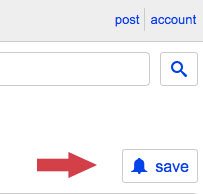
- Click the “Save Search” link: This will save your current search criteria for future use.
- Go to your account and open the “Searches” tab: This is where your saved searches are managed.
- Check the “Alert” box: This turns on email alerts for that saved search.
- You’re all set! Craigslist can now email you when new listings matching your saved search criteria are posted.
Here are screenshots that follow the process of setting up Craigslist alerts:



Tips for Effective Craigslist Alerts
Here are some additional tips to maximize your success with Craigslist alerts:
- Be specific with your search criteria: The more specific your search, the fewer irrelevant notifications you’ll receive. This will save you time and ensure you’re only alerted about listings you’re genuinely interested in. (Example: Instead of just saving the keyword “couch”, narrow your search down to be more specific like “vintage couch” or “modern couch”.)
- Use multiple alerts: You can create multiple saved searches and alerts to cover all your interests. This way, you won’t miss out on opportunities in different categories.
- Don’t forget to manage your alerts: Periodically review your saved searches and alerts, and remove any that are no longer relevant or useful. This will help keep your notification stream focused and relevant.
Conclusion About How To Set Up Alerts On Craigslist
You’re all set! Craigslist can now email you when new listings match your saved search keywords.
By following my tips above, you can set up awesome Craigslist alerts and make sure you’re always in the know about the latest listings. Unlock the full potential of Craigslist buying options and score some amazing deals! Also, be sure to check out my guide about how to sell items on Craigslist and browse the site for other tips! Leave comments below.
This guide does a great job on alert setup, but remember that not all sellers use perfect keywords or provide detailed descriptions. If you’re looking for something very specific or rare, it can still be beneficial to occasionally browse the broader category manually. You might find a hidden gem that didn’t match your precise alert keywords due to a seller’s less-than-optimal ad phrasing.